mirror of
https://github.com/SpartanJ/eepp.git
synced 2026-10-23 23:03:14 +03:00

665 lines
31 KiB
Markdown
665 lines
31 KiB
Markdown
# eepp
|
|
|
|
**eepp is an open source, cross-platform C++ GUI framework for building desktop applications,
|
|
tools, and rich graphical interfaces.**
|
|
|
|
It provides a hardware-accelerated retained-mode UI toolkit with CSS styling, XML layouts,
|
|
a comprehensive widget set, DPI-aware interfaces, data binding, rich text and HTML/Markdown
|
|
rendering, animations, internationalization, and application infrastructure.
|
|
|
|
[](https://github.com/SpartanJ/eepp/actions?query=workflow%3ALinux)
|
|
[](https://github.com/SpartanJ/eepp/actions?query=workflow%3AWindows)
|
|
[](https://github.com/SpartanJ/eepp/actions?query=workflow%3AmacOS)
|
|
[](https://github.com/SpartanJ/eepp/actions?query=workflow%3AiOS)
|
|
[](https://github.com/SpartanJ/eepp/actions?query=workflow%3AAndroid)
|
|
[](https://github.com/SpartanJ/eepp/actions?query=workflow%3Aemscripten)
|
|
|
|
|
|
|
|
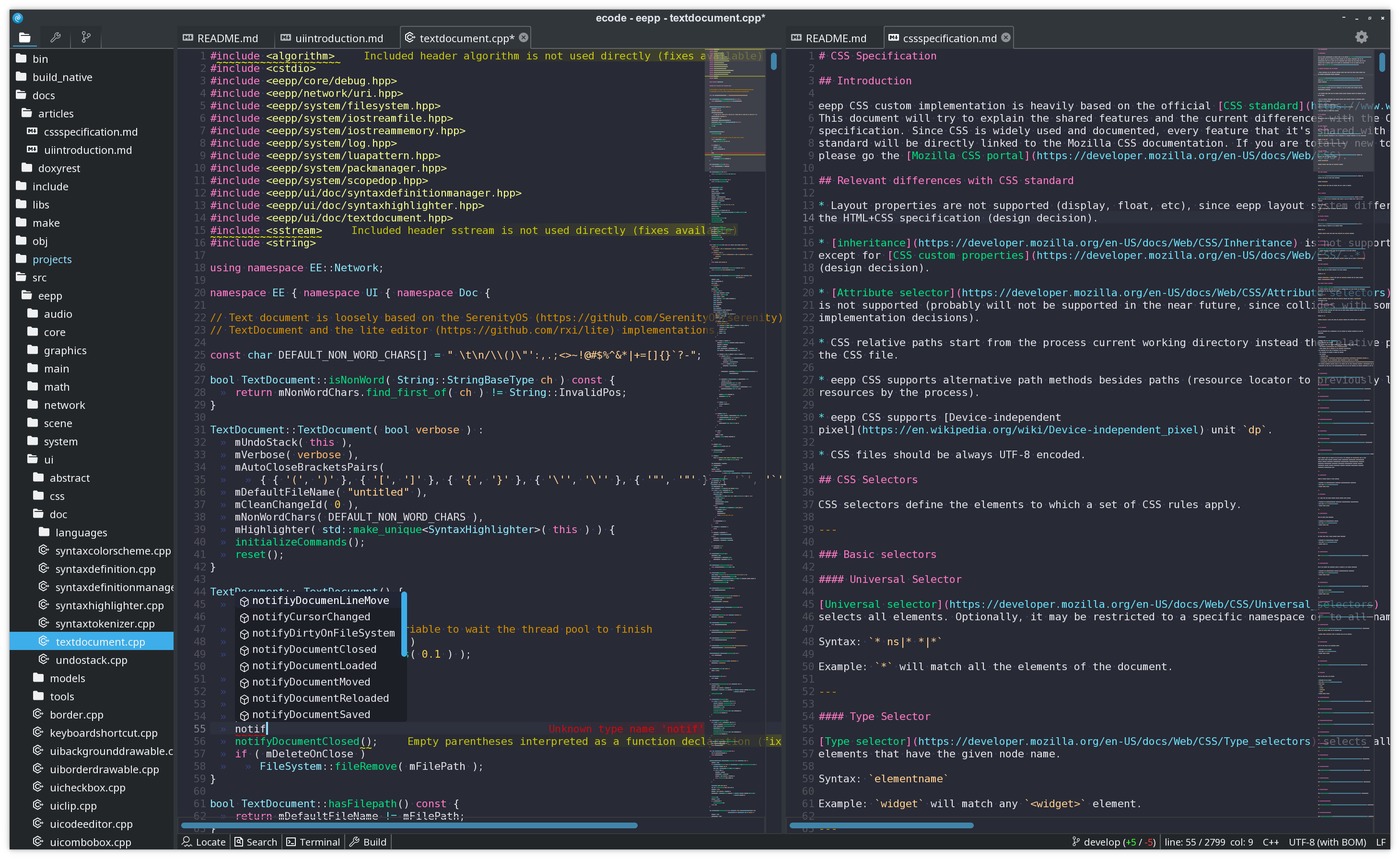
*The [ecode](https://github.com/SpartanJ/ecode/) code editor is built on the eepp GUI.*
|
|
|
|
## What eepp provides
|
|
|
|
* **A complete C++ GUI toolkit.** Build real desktop applications with windows, menus, tabs,
|
|
splitters, lists, tables, trees, text inputs, dialogs, scrolling containers, and many other
|
|
reusable widgets.
|
|
* **Hardware accelerated and retained-mode.** eepp owns its rendering stack and uses draw
|
|
invalidation, so unchanged interfaces do not need to be continuously redrawn.
|
|
* **CSS styling and theming.** Style widget trees with selectors, pseudo-classes, custom
|
|
properties, transitions, animations, media queries, `@font-face`, and reusable themes.
|
|
* **Declarative or programmatic UI.** Compose interfaces from XML layouts, C++, or a mix of
|
|
both, with reusable layout primitives and DPI-aware sizing.
|
|
* **Rich text and document surfaces.** Text selection, clipboard integration, Unicode, the
|
|
`UICodeEditor`, Markdown rendering through `UIMarkdownView`, and native HTML/CSS rendering
|
|
through `UIWebView`.
|
|
* **Model/view data controls.** Data-oriented widgets such as lists, tables, trees, and model-backed
|
|
selectors can use reusable data models, keeping application data separate from its presentation.
|
|
* **Application infrastructure included.** Commands and key bindings, data binding,
|
|
internationalization, resource management, virtual filesystems, threading, networking,
|
|
filesystem APIs, and runtime UI inspection are part of the same framework.
|
|
* **Cross-platform from one codebase.** Linux, Windows, macOS, FreeBSD, Haiku, Android, iOS,
|
|
and the web through Emscripten/WebAssembly.
|
|
* **MIT licensed.**
|
|
|
|
## GUI framework
|
|
|
|
### Application UI
|
|
|
|
The UI system is a retained-mode widget hierarchy with event handling, focus management,
|
|
clipping, animations, transforms, messages, commands, key bindings, text selection, clipboard
|
|
support, themes, and reusable application-level controls.
|
|
|
|
Interfaces can be built directly in C++ or loaded from XML. The layout system includes
|
|
`LinearLayout`, `RelativeLayout`, `GridLayout`, size policies, margins, padding, alignment,
|
|
and pixel-density-aware units.
|
|
|
|
Several data-oriented components follow a model/view architecture, allowing the same application
|
|
data to be presented and manipulated independently from the widgets displaying it.
|
|
|
|
### Styling and theming
|
|
|
|
Widgets can be styled using eepp's CSS implementation. It supports the familiar model of
|
|
selectors and pseudo-classes together with features such as custom properties, transitions,
|
|
animations, media queries, `@font-face`, backgrounds, borders, box-model properties, text
|
|
styling, and theme-specific extensions.
|
|
|
|
The default Breeze-based theme is implemented in CSS and can be used as a reference for
|
|
building complete application themes.
|
|
|
|
### Rich text, Markdown, HTML and CSS
|
|
|
|
`UIWebView` renders HTML documents natively on the eepp UI stack, and `UIMarkdownView` uses the
|
|
same infrastructure for Markdown content. The HTML/CSS compatibility layer includes block and
|
|
inline layout, Flexbox, Grid, tables, lists, absolute/fixed/relative/sticky positioning, floats,
|
|
rich inline text, document-scoped stylesheets, viewport/media queries, and scoped font resources.
|
|
|
|
Where implemented, the HTML/CSS layer follows the CSS and HTML Living Standard specifications
|
|
rather than defining custom layout behavior.
|
|
|
|
### Rendering and runtime
|
|
|
|
The GUI is backed by eepp's graphics and windowing layers rather than platform-native widgets.
|
|
Rendering is hardware accelerated, automatically batched, and supports draw invalidation to keep
|
|
idle application resource usage low. The renderer supports OpenGL 2, OpenGL 3, OpenGL ES and
|
|
OpenGL Core Profile backends, while SDL2 currently provides the main window/input backend.
|
|
|
|
eepp also provides a terminal runtime that can render GUI applications inside compatible terminals
|
|
using the Kitty graphics protocol. Applications can opt into it with EEPP_RUNTIME=terminal, using
|
|
the same eepp UI rather than a separate terminal-specific interface.
|
|
|
|
The runtime UI inspector can query and interact with live widget trees, which is useful for
|
|
application debugging, automated validation, and development tooling.
|
|
|
|
## Platforms
|
|
|
|
Officially supported platforms include **Linux, Windows, macOS, FreeBSD, Haiku, Android and
|
|
iOS**. Applications can also be exported to the web with **Emscripten/WebAssembly**, with some
|
|
platform-specific limitations.
|
|
|
|
## Framework foundations
|
|
|
|
The GUI framework is built on a set of lower-level eepp modules. They are usable independently,
|
|
but today they primarily provide the portable foundation for eepp applications.
|
|
|
|
| Module | Provides |
|
|
| --- | --- |
|
|
| **Graphics** | GPU rendering, fonts, shaders, framebuffers, textures, image loading, clipping, drawables, texture atlases and batching. |
|
|
| **Window** | SDL2-based windows and input, clipboard, cursors, display management and joystick support. |
|
|
| **System / Core** | Threads, clocks, resources, localization, virtual filesystems, Unicode strings and core utilities. |
|
|
| **Network** | HTTP/HTTPS, asynchronous requests, TCP/UDP, FTP/FTPS, proxies, redirects, compression and resume support. |
|
|
| **Audio** | OpenAL/mojoAL-based audio with OGG, WAV, MP3 and FLAC support. |
|
|
| **Terminal / eterm** | Reusable terminal emulator module and GUI terminal widget, used by applications such as ecode and the eterm terminal application. |
|
|
| **Scene** | Node hierarchy, events, messages and programmable actions. |
|
|
| **Physics / Maps** | Optional Chipmunk2D wrapper and tiled-map support inherited from eepp's game-framework origins. |
|
|
|
|
## Applications and tools built with eepp
|
|
|
|
### ecode - Code Editor
|
|
|
|
[ecode](https://github.com/SpartanJ/ecode/) is a full-featured code editor and the largest
|
|
real-world application built with eepp. Its interface, editor widgets, themes, terminals,
|
|
settings UI, dialogs and application chrome are all built on the eepp GUI.
|
|
|
|
### First-party applications in this repository
|
|
|
|
* **[eproc](src/tools/eproc/)** - system monitor built with the eepp application and UI stack.
|
|
* **[eterm](src/tools/eterm/)** - terminal emulator demonstrating tabs, splits, settings UI and
|
|
the reusable `eterm` terminal module.
|
|
* **[eeiv](src/tools/eeiv/)** - image viewer implemented on the current eepp GUI stack.
|
|
|
|
These applications are developed alongside the framework and serve as practical test beds for
|
|
its desktop application APIs.
|
|
|
|
### UI Editor
|
|
|
|
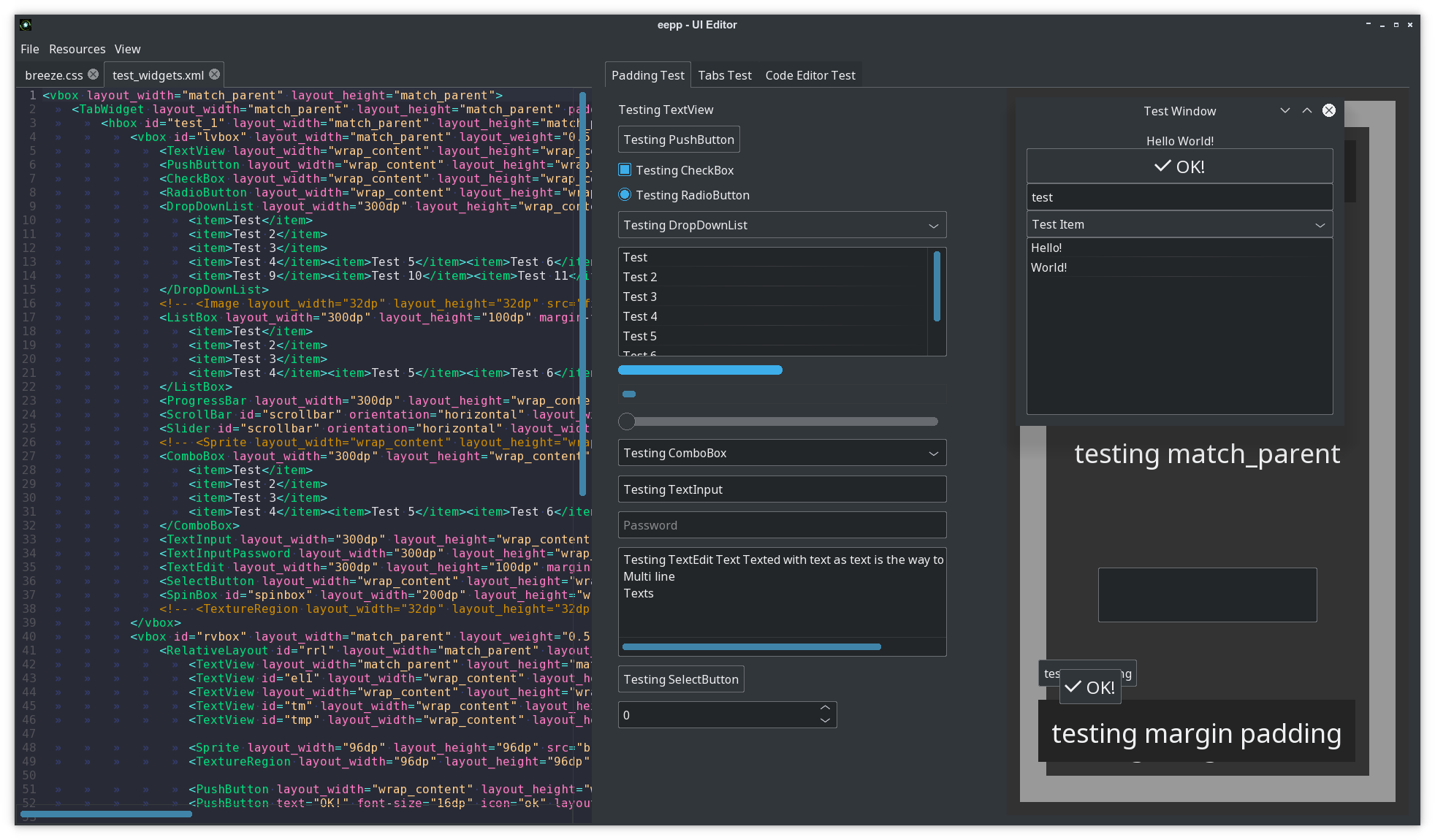
The UI Editor loads layouts and CSS and displays changes in real time, making it useful for
|
|
iterating on eepp interfaces and themes.
|
|
|
|
|
|
|
|
The project also includes graphics-oriented tools such as the Texture Atlas Editor and Map Editor,
|
|
reflecting eepp's origins as a broader multimedia/game-development framework.
|
|
|
|
## Documentation
|
|
|
|
API documentation is available at [cdn.ensoft.dev/eepp-docs](https://cdn.ensoft.dev/eepp-docs/index.html).
|
|
The repository also contains examples in `src/examples`, tests in `src/test`, tools in `src/tools`,
|
|
and focused guides for the GUI framework:
|
|
|
|
* [UI introduction](docs/articles/ui_introduction.md)
|
|
* [UI data binding](docs/articles/ui_databinding.md)
|
|
* [Runtime UI inspector](docs/articles/ui_inspector.md)
|
|
* [CSS specification](docs/articles/css_specification.md)
|
|
|
|
Contributions and pull requests are welcome. Before participating, please read the
|
|
[contribution and community support guidelines](CONTRIBUTING.md) and the
|
|
[Code of Conduct](CODE_OF_CONDUCT.md).
|
|
|
|
## Getting eepp
|
|
|
|
### Nightly SDK builds
|
|
|
|
Prebuilt **eepp SDKs** are automatically produced from the latest `develop` branch and are
|
|
available from the [nightly release](https://github.com/SpartanJ/eepp/releases/tag/nightly).
|
|
|
|
Nightly SDK packages are provided for several desktop platforms and toolchains, making it possible
|
|
to start developing with eepp without building the framework and its dependencies from source.
|
|
|
|
### From source
|
|
|
|
The repository uses git submodules. Clone it together with its submodules with:
|
|
|
|
`git clone --recurse-submodules https://github.com/SpartanJ/eepp.git`
|
|
|
|
## UI Layout XML example
|
|
|
|
It should look really familiar to any Android developer. This is a window with
|
|
the most basic widgets in a vertical linear layout display.
|
|
|
|
```xml
|
|
<window layout_width="300dp" layout_height="300dp" window-flags="default|maximize|shadow">
|
|
<LinearLayout id="testlayout" orientation="vertical" layout_width="match_parent" layout_height="match_parent" layout_margin="8dp">
|
|
<TextView text="Hello World!" gravity="center" layout_gravity="center_horizontal" layout_width="match_parent" layout_height="wrap_content" backgroundColor="black" />
|
|
<PushButton text="OK!" textSize="16dp" icon="ok" gravity="center" layout_gravity="center_horizontal" layout_width="match_parent" layout_height="wrap_content" />
|
|
<Image src="thecircle" layout_width="match_parent" layout_height="32dp" flags="clip" />
|
|
<Sprite src="gn" />
|
|
<TextInput text="test" layout_width="match_parent" layout_height="wrap_content" />
|
|
<DropDownList layout_width="match_parent" layout_height="wrap_content" selectedIndex="0">
|
|
<item>Test Item</item>
|
|
<item>@string/test_item</item>
|
|
</DropDownList>
|
|
<ListBox layout_width="match_parent" layout_height="match_parent" layout_weight="1">
|
|
<item>Hello!</item>
|
|
<item>World!</item>
|
|
</ListBox>
|
|
</LinearLayout>
|
|
</window>
|
|
```
|
|
|
|
**UI introduction can be found [here](docs/articles/ui_introduction.md)**.
|
|
|
|
**The UI data-binding guide can be found [here](docs/articles/ui_databinding.md).**
|
|
|
|
**The UI accessibility guide can be found [here](docs/articles/ui_accessibility.md).**
|
|
|
|
**The runtime UI inspector guide can be found [here](docs/articles/ui_inspector.md).**
|
|
|
|
## UI Widgets with C++ example
|
|
|
|
How does it look with real code?
|
|
|
|
```cpp
|
|
UITextView::New()->setText( "Text on test 1" )
|
|
->setCharacterSize( 12 )
|
|
->setLayoutMargin( Rect( 10, 10, 10, 10 ) )
|
|
->setLayoutSizePolicy( SizePolicy::MatchParent, SizePolicy::WrapContent )
|
|
->setParent( layout );
|
|
```
|
|
|
|
## UI Styling
|
|
|
|
Element styling can be done with a custom implementation of Cascading Style
|
|
Sheets, most common CSS2 rules are available, plus several CSS3 rules (some
|
|
examples: [animations](https://developer.mozilla.org/en-US/docs/Web/CSS/CSS_Animations/),
|
|
[transitions](https://developer.mozilla.org/en-US/docs/Web/CSS/CSS_Transitions),
|
|
[custom properties](https://developer.mozilla.org/en-US/docs/Web/CSS/Using_CSS_custom_properties),
|
|
[media queries](https://developer.mozilla.org/en-US/docs/Web/CSS/Media_Queries/Using_media_queries),
|
|
[@font-face at rule](https://developer.mozilla.org/en-US/docs/Web/CSS/@font-face),
|
|
[:root element](https://developer.mozilla.org/en-US/docs/Web/CSS/:root)).
|
|
Here is a small example on how the CSS looks like:
|
|
|
|
```css
|
|
@font-face {
|
|
font-family: "OpenSans Regular";
|
|
src: url("https://raw.githubusercontent.com/SpartanJ/eepp/develop/bin/assets/fonts/OpenSans-Regular.ttf");
|
|
}
|
|
|
|
@import url("assets/layouts/imported.css") screen and (min-width: 800px);
|
|
|
|
:root {
|
|
--font-color: black;
|
|
--background-input-color: rgba(255, 255, 255, 0.7);
|
|
--border-color: black;
|
|
--border-width: 1dp;
|
|
}
|
|
|
|
.screen TextView {
|
|
color: var(--font-color);
|
|
}
|
|
|
|
.form {
|
|
background-image: @drawable/back;
|
|
background-repeat: no-repeat;
|
|
background-size: cover;
|
|
}
|
|
|
|
.form .form_inputs {
|
|
background-color: var(--non-existent, var(--background-input-color));
|
|
margin-left: 100dp;
|
|
margin-right: 100dp;
|
|
padding-top: 72dp;
|
|
padding-left: 57dp;
|
|
padding-right: 57dp;
|
|
padding-bottom: 115dp;
|
|
}
|
|
|
|
.screen TextView.input,
|
|
.screen TextInput.input {
|
|
font-family: AkzidenzGroteskBQ-Cnd;
|
|
layout-width: match_parent;
|
|
layout-height: 80dp;
|
|
border-color: var(--border-color);
|
|
border-width: var(--border-width);
|
|
color: var(--font-color);
|
|
padding-left: 40dp;
|
|
padding-right: 40dp;
|
|
margin-bottom: 32dp;
|
|
skin: none;
|
|
hint-font-family: AkzidenzGroteskBQ-Cnd;
|
|
hint-font-size: 46dp;
|
|
hint-color: #818285;
|
|
background-color: #FFFFFF00;
|
|
transition: all 0.125s;
|
|
}
|
|
|
|
.screen TextInput.input:focus {
|
|
background-color: #FFFFFF66;
|
|
border-color: #796500;
|
|
}
|
|
|
|
.screen TextInput.input:hover {
|
|
background-color: #FFFFFF66;
|
|
}
|
|
|
|
@media screen and (max-width: 1024px) {
|
|
|
|
.form .form_inputs {
|
|
background-color: red;
|
|
}
|
|
|
|
}
|
|
```
|
|
|
|
**The complete CSS specification can be found in the docs: [here](docs/articles/css_specification.md).**
|
|
|
|
**You can also check how a pure CSS theme looks like in eepp: [here](https://github.com/SpartanJ/eepp/blob/develop/bin/assets/ui/breeze.css).**
|
|
|
|
## Live demos (using emscripten)
|
|
|
|
Since eepp supports emscripten you can take a quick look on some of the examples, demos and tools that
|
|
the library currently provides. Please be aware that you'll find some differences based on the limitations
|
|
that emscripten have at the moment (no access to the file system, no custom cursors, etc) and also
|
|
demos are not optimized for size and they're bigger than they should be.
|
|
Note: Please use a modern browser with good WebGL and WASM support (Chrome/ium 70+ or Firefox 80+).
|
|
|
|
* **[ecode - Code Editor](https://cdn.ensoft.dev/eepp-demos/demo-fs.html?run=ecode.js)**
|
|
|
|
* **[UI Editor](https://cdn.ensoft.dev/eepp-demos/demo-fs.html?run=eepp-UIEditor.js)**
|
|
|
|
* **[UI Hello World](https://cdn.ensoft.dev/eepp-demos/demo-fs.html?run=eepp-ui-hello-world.js)**
|
|
|
|
* **[Texture Atlas Editor](https://cdn.ensoft.dev/eepp-demos/demo-fs.html?run=eepp-TextureAtlasEditor.js)**
|
|
|
|
* **[Map Editor](https://cdn.ensoft.dev/eepp-demos/demo-fs.html?run=eepp-MapEditor.js)**
|
|
|
|
* **[Fonts example](https://cdn.ensoft.dev/eepp-demos/demo-fs.html?run=eepp-fonts.js)**
|
|
|
|
* **[Physics module demo](https://cdn.ensoft.dev/eepp-demos/demo-fs.html?run=eepp-physics-demo.js)**
|
|
|
|
* **[Sprites example](https://cdn.ensoft.dev/eepp-demos/demo-fs.html?run=eepp-sprites.js)**
|
|
|
|
* **[Full Test](https://cdn.ensoft.dev/eepp-demos/demo-fs.html?run=eepp-test.js)**
|
|
|
|
### 7GUIs Examples
|
|
|
|
[7GUIs](https://7guis.github.io/7guis/) is known as a "GUI Programming Benchmark" that it's used to
|
|
compare different GUI libraries and explore each library approach to GUI programming. All the 7 tasks
|
|
proposed in 7GUIs has been implemented for eepp. The tasks are very good representative of what can
|
|
be achieved with eepp GUI and also are very useful to demonstrate how to implement different tasks
|
|
with the library.
|
|
|
|
The 7GUIs are composed by the following tasks:
|
|
|
|
* [Counter](https://7guis.github.io/7guis/tasks#counter): [Demo](https://cdn.ensoft.dev/eepp-demos/demo-fs.html?run=eepp-7guis-counter.js) and [code implementation](https://github.com/SpartanJ/eepp/blob/develop/src/examples/7guis/counter/counter.cpp).
|
|
|
|
* [Temperature Converter](https://7guis.github.io/7guis/tasks#temp): [Demo](https://cdn.ensoft.dev/eepp-demos/demo-fs.html?run=eepp-7guis-temperature-converter.js) and [code implementation](https://github.com/SpartanJ/eepp/blob/develop/src/examples/7guis/temperature_converter/temperature_converter.cpp).
|
|
|
|
* [Flight Booker](https://7guis.github.io/7guis/tasks#flight): [Demo](https://cdn.ensoft.dev/eepp-demos/demo-fs.html?run=eepp-7guis-flight-booker.js) and [code implementation](https://github.com/SpartanJ/eepp/blob/develop/src/examples/7guis/flight_booker/flight_booker.cpp).
|
|
|
|
* [Timer](https://7guis.github.io/7guis/tasks#timer): [Demo](https://cdn.ensoft.dev/eepp-demos/demo-fs.html?run=eepp-7guis-timer.js) and [code implementation](https://github.com/SpartanJ/eepp/blob/develop/src/examples/7guis/timer/timer.cpp).
|
|
|
|
* [CRUD](https://7guis.github.io/7guis/tasks#crud): [Demo](https://cdn.ensoft.dev/eepp-demos/demo-fs.html?run=eepp-7guis-crud.js) and [code implementation](https://github.com/SpartanJ/eepp/blob/develop/src/examples/7guis/crud/crud.cpp).
|
|
|
|
* [Circle Drawer](https://7guis.github.io/7guis/tasks#circle): [Demo](https://cdn.ensoft.dev/eepp-demos/demo-fs.html?run=eepp-7guis-circle-drawer.js) and [code implementation](https://github.com/SpartanJ/eepp/blob/develop/src/examples/7guis/circle_drawer/circle_drawer.cpp).
|
|
|
|
* [Cells](https://7guis.github.io/7guis/tasks#cells): [Demo](https://cdn.ensoft.dev/eepp-demos/demo-fs.html?run=eepp-7guis-cells.js) and [code implementation](https://github.com/SpartanJ/eepp/tree/develop/src/examples/7guis/cells).
|
|
|
|
## How to build it
|
|
|
|
The library has only one external dependency. You will only need **SDL2** library with the headers
|
|
installed. Also **premake5** or **premake4** is needed to generate the Makefiles or project
|
|
files to build the library. I will assume that you know what you are doing and
|
|
skip the basics.
|
|
|
|
Notice: eepp uses [mojoAL](https://icculus.org/mojoAL/) by default as an OpenAL drop-in replacement.
|
|
OpenAL is optionally available as an audio backend. If you want to use it, you
|
|
have the alternative to enable it. To enable it and disable the mojoAL drop-in replacemente, you
|
|
need to add the parameter `--without-mojoal` to any `premake` call
|
|
( ex: `premake5 --without-mojoal gmake` ).
|
|
|
|
### GNU/Linux
|
|
|
|
In a Ubuntu system it would be something like ( also you will need gcc but it
|
|
will be installed anyways ):
|
|
|
|
`sudo apt-get install premake5 libsdl2-2.0-0 libsdl2-dev`
|
|
|
|
Clone the repository and run on the repository root directory:
|
|
|
|
`premake5 gmake`
|
|
|
|
or if you have premake4 installed you can run:
|
|
|
|
`premake4 gmake`
|
|
|
|
Then just build the library:
|
|
|
|
if `premake4` was used:
|
|
|
|
`make -C make/linux config=release` (`config=debug` for debug build)
|
|
|
|
if `premake5` was used:
|
|
|
|
`make -C make/linux config=release_x86_64` (`debug_x86_64` for debug build, or `release_arm64`/`debug_arm64` if building from arm64)
|
|
|
|
That's it. That will build the whole project.
|
|
|
|
### Windows
|
|
|
|
You have two options: build with [Visual Studio](https://visualstudio.microsoft.com/)
|
|
or with [MinGW](https://github.com/skeeto/w64devkit/releases/latest).
|
|
To be able to build the project with any of these options first you will need to
|
|
generate the project files with [premake4 or premake5](https://premake.github.io/download).
|
|
Then you will need to add the binary file to any of the executable paths defined
|
|
in `PATH` ( or add one, or use it from a local path ).
|
|
Download *Visual Studio* or *MinGW* files depending on your needs.
|
|
|
|
#### Visual Studio
|
|
|
|
You will need to use premake5 and run:
|
|
|
|
`premake5.exe --windows-vc-build vs2022`
|
|
|
|
Then the project files should be found in `make/windows/`. A complete solution
|
|
and all the project will be available. Having installed everything, you'll be
|
|
able to build the *Visual Studio* solution as any other project.
|
|
|
|
Using the command line argument `--windows-vc-build` will download the SDL2 dependency automatically
|
|
and add the paths to the build process to link against it without the need to download manually any
|
|
external dependency.
|
|
|
|
Then just build the solution in Visual Studio or run `MSBuild` manually in a
|
|
console:
|
|
|
|
`"%MSBUILD_PATH%\MSBuild.exe" .\make\windows\eepp.sln -m`
|
|
|
|
Where `%MSBUILD_PATH%` is the MSBuild.exe Visual Studio path, for example for
|
|
_VS2022 Community Edition_ the path usually is:
|
|
|
|
`C:\Program Files\Microsoft Visual Studio\2022\Community\MSBuild\Current\Bin\`
|
|
|
|
#### MinGW
|
|
|
|
Windows MinGW builds are being produced and tested with [w64devkit](https://github.com/skeeto/w64devkit/releases/latest) distribution.
|
|
MSYS is currently not officially supported given some issues found on the build process (but it's possible to build with some extra steps).
|
|
|
|
If you're using w64devkit you'll have to [download](https://github.com/skeeto/w64devkit/releases/latest) it and extract it, we will assume that it's extracted at `C:\w64devkit`.
|
|
|
|
Execute `C:\w64devkit\w64devkit.exe` as an administrator (`right click` -> `Run as administrator` ).
|
|
|
|
Then go to the `eepp` cloned repository directory and run:
|
|
|
|
`premake5.exe --windows-mingw-build gmake`
|
|
|
|
`--windows-mingw-build` will automatically download and link external dependencies (SDL2).
|
|
|
|
Then just build the project located in `make/windows/` with `mingw32-make.exe` or any equivalent:
|
|
|
|
`mingw32-make.exe -C make\\windows config=release_x86_64`
|
|
|
|
To build a debug build run:
|
|
|
|
`mingw32-make.exe -C make\\windows config=debug_x86_64`
|
|
|
|
And then make sure to copy the `SDL2.dll` file located at `src/thirdparty/SDL2-2.XX.X/x86_64-w64-mingw32/bin/SDL2.dll` to `bin`.
|
|
If for some reason `eepp.dll` (or `eepp-debug.dll`) hasn't being copied automatically you can copy them from `libs/windows/x86_64/` to `bin`.
|
|
|
|
### macOS
|
|
|
|
You will need the prebuild binaries and development libraries of
|
|
[SDL2](http://libsdl.org/download-2.0.php), OpenAL is included with the OS.
|
|
Install the SDL2 framework and you should be able to build the project.
|
|
|
|
You have two options to build the project: with *XCode* or with *Makefiles*.
|
|
To build with any of both options first you will also need to build the project
|
|
files with [premake4 or premake5](https://premake.github.io/download.html).
|
|
|
|
#### Makefiles
|
|
|
|
##### Using premake5
|
|
|
|
Generate the project:
|
|
|
|
`premake5 --use-frameworks gmake`
|
|
|
|
And build it:
|
|
|
|
`make -C make/macosx config=release_x86_64` (or `config=debug_x86_64` for a debug build, or `release_arm64`/`debug_arm64` if building from arm64)
|
|
|
|
##### Using premake4
|
|
|
|
You can use the `projects/osx/make.sh` script, that generates the *Makefiles*
|
|
and builds the project.
|
|
|
|
#### XCode
|
|
|
|
Run:
|
|
|
|
`premake5 --use-frameworks xcode4`
|
|
|
|
And open the XCode project generated at `make/macosx/` or simply build from the
|
|
command line with:
|
|
|
|
`xcodebuild -project make/macosx/project-name.xcodeproj`
|
|
|
|
### Android
|
|
|
|
There's a gradle project in `projects/android-project/`. It will build the
|
|
library with all the dependencies included. Use the example project as a base
|
|
for your project. Notice that there's a `eepp.mk` project file that builds the
|
|
library. That file can be used in you projects.
|
|
|
|
### iOS
|
|
|
|
The project provides two files to build the library and the demos. You can use
|
|
any of them depending on your needs.
|
|
The files are located in `projects/ios`:
|
|
|
|
#### gen-xcode4-proj.sh script
|
|
|
|
This script can be used to generate the xcode projects and solution of all the
|
|
included projects in eepp (demos, tools, shared lib, static lib, etc). It will
|
|
also download and build the SDL2 fat static library in order to be able to
|
|
reference the library to the project. After building the projects sadly you'll
|
|
need to make some minor changes to any/all of the projects you wan't to build
|
|
or test, since the project generated lacks some minor configurations. After
|
|
you run this script you'll need to open the solution located in
|
|
`make/ios/eepp.xcworkspace`. To build the static libraries you'll not find any
|
|
problem (that will work out of the box). But to test some of the examples it's
|
|
required to:
|
|
|
|
##### Add the Info.plist file
|
|
|
|
Select (click on the project name) the project you want to test, for example
|
|
`eepp-empty-window`. You will se several tabs/options, go to _Build Settings_,
|
|
and locate the option _Info.plist_ file, double click to edit and write:
|
|
`Info.plist`. This will indicate to read that file that is located in the same
|
|
directory than the project. The go to the tab _General_ and complete the
|
|
_Bundle Identifier_ with an identifier name of the app bundle that will be
|
|
generated, for this example you can use something like: `eepp-empty-window`.
|
|
That will allow you to build and run the project.
|
|
|
|
##### Add resources to the project
|
|
|
|
This `eepp-empty-window` demo does not use any assets/resources, but other demos
|
|
will need to load assets, and this assets need to be added to the project in order
|
|
to be available to the app bundle. For example, the project `eepp-ui-hello-world`,
|
|
will require you to add the `assets` folder into the project. What you need to do
|
|
is: select the project and go to the _Build Phases_ tab, in _Copy Bundles Resources_
|
|
click in the plus icon (+), then go to _Add Other..._ and locate and select the
|
|
`bin/assets/` folder and _Finish_. That should be enough.
|
|
|
|
#### compile-all.sh script
|
|
|
|
This script can be used to build the SDL2 and eepp as two fat static libraries
|
|
with arm64 and x86_64 architectures in it (arm64 for iPhone/iPad and x86_64 for
|
|
the simulators). To generate a release build pass `config=release_arm64` as a parameter
|
|
for the script (`sh compile-all.sh config=release_arm64`). The built files will be
|
|
located in `libs/ios/`, as `libSDL2.a` and `libeepp.a` (or `libeepp-debug.a` for
|
|
debug build). This two files can be integrated in your project.
|
|
|
|
### emscripten
|
|
|
|
You will first need to [download and install emscripten](https://emscripten.org/docs/getting_started/downloads.html).
|
|
Then there's a script for building the **emscripten** project in
|
|
`projects/emscripten/make.sh`. Before running this script remember to set the
|
|
emsdk environment, it should be something like: `source /path/to/emsdk/emsdk_env.sh`.
|
|
That should be enough in **GNU/Linux** or **macOS** ( only tested this on GNU/Linux ).
|
|
|
|
## How to run the demos and tools?
|
|
|
|
All the binaries are located at the `bin` directory after built. The binaries require two files:
|
|
the eepp library and the SDL2 library. The eepp library will be located in `libs/{OS}/`. The build
|
|
script will try to symlink the eepp library into `bin`, if that fails it should be copied or
|
|
symlinked manually. Regarding the SDL2 library is not provided in the repository, so in order to run
|
|
the demos you'll need to download the correct SDL2 library OS version and architecture.
|
|
|
|
## Project direction and history
|
|
|
|
eepp began as **Entropia Engine++**, a general-purpose multimedia and game-development framework.
|
|
Over time the project evolved around its strongest and most actively developed area: the GUI and
|
|
application toolkit. Today eepp is developed primarily as a cross-platform C++ GUI framework,
|
|
while the graphics, windowing, system, networking, audio, scene, physics and map modules remain
|
|
available as the lower-level foundation inherited from that history.
|
|
|
|
The framework is used by real applications including ecode and the first-party tools developed in
|
|
this repository. Those applications are also important test beds: new widgets, application APIs,
|
|
styling features and runtime tooling are exercised in production-sized interfaces instead of only
|
|
in isolated examples.
|
|
|
|
The API is mature but not completely frozen. eepp has been developed for many years, so some older
|
|
areas of the codebase still use legacy C++ patterns. Modernization is done incrementally where it
|
|
provides a clear benefit, while new code generally follows newer C++ practices.
|
|
|
|
Ideas and experience have come from many projects and ecosystems over the years, including the
|
|
Android UI toolkit, SFML, cocos2d-x, raylib, libGDX, Godot, XNA, LÖVE and others. eepp keeps its own
|
|
implementation where doing so provides useful control over portability, rendering, UI behavior and
|
|
application integration.
|
|
|
|
### Current priorities
|
|
|
|
* Keep expanding and refining the GUI widget set, layouts, CSS support and theming system.
|
|
* Improve the HTML/CSS compatibility layer and rich-document components.
|
|
* Improve GUI documentation, examples and developer tooling.
|
|
* Continue using ecode, eproc, eterm, eeiv and other first-party applications to drive and validate
|
|
framework development.
|
|
* Continue modernizing the codebase where it improves maintainability without unnecessary churn.
|
|
* Evaluate scripting support after the core APIs are sufficiently stable.
|
|
* Keep legacy game-oriented modules available where useful, while focusing new development effort
|
|
on the GUI and application framework.
|
|
|
|
Contributors are welcome, especially around the GUI framework, documentation, examples, platform
|
|
support and developer tooling.
|
|
|
|
## Acknowledgements
|
|
|
|
### Special thanks to
|
|
|
|
* Sean Barrett for stb_image and all the [stb](https://github.com/nothings/stb) libraries.
|
|
|
|
* Sam Latinga for [Simple DirectMedia Layer](https://www.libsdl.org/).
|
|
|
|
* Jonathan Dummer for the [Simple OpenGL Image Library](https://www.lonesock.net/soil.html).
|
|
|
|
* Laurent Gomila for [SFML](https://www.sfml-dev.org/)
|
|
|
|
* Yuri Kobets for [litehtml](https://github.com/litehtml/litehtml)
|
|
|
|
* Michael R. P. Ragazzon for [RmlUI](https://github.com/mikke89/RmlUi)
|
|
|
|
* rxi for [lite](https://github.com/rxi/lite)
|
|
|
|
* Andreas Kling for [SerenityOS](https://github.com/SerenityOS/serenity)
|
|
|
|
* Ryan C. Gordon for [mojoAL](https://icculus.org/mojoAL/)
|
|
|
|
* David Reid for [dr_libs](https://github.com/mackron/dr_libs)
|
|
|
|
* Lion (Lieff) for [minimp3](https://github.com/lieff/minimp3) and more
|
|
|
|
* Lewis Van Winkle for [PlusCallback](https://github.com/codeplea/pluscallback)
|
|
|
|
* Dieter Baron and Thomas Klausner for [libzip](https://libzip.org/)
|
|
|
|
* Jean-loup Gailly and Mark Adler for [zlib](https://zlib.net/)
|
|
|
|
* Milan Ikits and Marcelo Magallon for [GLEW](http://glew.sourceforge.net/)
|
|
|
|
* Mikko Mononen for [nanosvg](https://github.com/memononen/nanosvg)
|
|
|
|
* Scott Lembcke for [Chipmunk2D](https://github.com/slembcke/Chipmunk2D)
|
|
|
|
* Christophe Riccio for [glm](https://github.com/g-truc/glm)
|
|
|
|
* Rich Geldreich for [imageresampler](https://github.com/richgel999/imageresampler) and [jpeg-compressor](https://github.com/richgel999/jpeg-compressor)
|
|
|
|
* Arseny Kapoulkine for [pugixml](https://github.com/zeux/pugixml)
|
|
|
|
* Jason Perkins for [premake](https://premake.github.io/)
|
|
|
|
* Martín Lucas Golini ( me ) and all the several contributors for [SOIL2](https://github.com/SpartanJ/SOIL2) and [efsw](https://github.com/SpartanJ/efsw)
|
|
|
|
* The Xiph open source community for [libogg](https://xiph.org/ogg/) and [libvorbis](https://xiph.org/vorbis/)
|
|
|
|
* The [ARMmbed](https://github.com/ARMmbed) community for [mbed TLS](https://tls.mbed.org/)
|
|
|
|
* [kcat](https://github.com/kcat) for [openal-soft](http://kcat.strangesoft.net/openal.html)
|
|
|
|
* The [FreeType Project](https://www.freetype.org/freetype2/docsindex.html)
|
|
|
|
* And a **lot** more people!
|
|
|
|
## Code License
|
|
|
|
[MIT License](http://www.opensource.org/licenses/mit-license.php)
|